1Capture-Screenshot for Mac Free Download
1Capture-Screenshot for Mac is good for basic captures, but it falls short when you need anything beyond a simple PNG saved to your Desktop. You cannot freely resize a selection after you start drawing it. Annotation tools are minimal. There is no OCR, no GIF recording, and no way to blur sensitive information or pin a screenshot on top of your other windows. That is exactly the gap 1Capture fills.
1Capture Screenshot is a native macOS app developed by HapiGo Inc. It supports all three core capture modes. You can capture a selected area, a specific window, or the entire screen. The key difference from the default tool is flexibility. With 1Capture, you can freely adjust the boundaries of your selected area even after you have started drawing the selection. This sounds like a small detail, but in practice, it saves a lot of frustration when precision matters. You can also download CleanShot X for Mac as another great screenshot option.
1Capture Screenshot for macOS Download
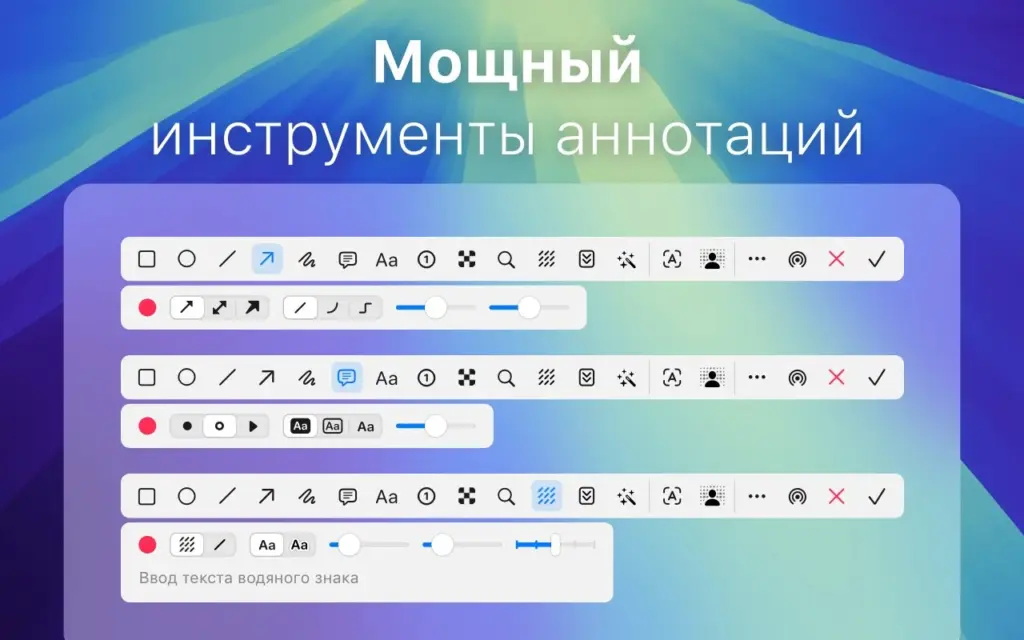
The annotation editor is where 1Capture stands out the most. It includes arrows, lines, shapes, and brushes. It also features a multi-pixelation tool that lets you blur either the entire image or only the text within it. A fluorescent marker automatically adjusts its height to match the text it highlights.
Another unique feature is the numbered dots system. You can place numbered markers directly on the screenshot and write explanations outside the image as a separate list. This keeps important content visible without covering it with text annotations.
The smart features go even further. OCR lets you extract text from any screenshot instantly. The AI Eraser, available on Apple Silicon Macs, removes unwanted objects from captures using on-device machine learning. The Pin to Desktop mode lets you keep screenshots visible above all open windows while you work.
Version 1.8.0 introduced full-screen recording, click animation support, and GIF export. These additions make 1Capture a complete capture suite rather than just a screenshot app.
1Capture Screenshot for Mac
1Capture Screenshot is a Universal Binary application. It runs natively on both Apple Silicon and Intel Macs. The app supports macOS 12.3 Monterey and newer versions, including macOS Sequoia and macOS Tahoe.
It is available in eleven languages, including English, Russian, German, Spanish, French, Japanese, Korean, and Chinese. Overall, 1Capture Screenshot is a strong upgrade from the default macOS screenshot tool for users who work with screenshots regularly.
Features of 1Capture Screenshot for Mac
- Capture a selected area, specific window, or the entire screen
- Freely adjust selection boundaries even after starting to draw them
- Built-in arrow, line, shape, and brush annotation tools
- Multi-pixelation tool that blurs the entire image or only the text within it
- Fluorescent marker that automatically adjusts its height to match highlighted text
- Numbered dots system with indexed markers and external descriptions
- OCR text extraction from screenshots
- AI Eraser removes unwanted objects using on-device Apple Silicon processing
- Pin to Desktop mode keeps screenshots floating above all open windows
- Built-in screen recording with click animation support
- GIF recording and export
- Supports macOS 12.3 Monterey and later, including macOS Tahoe
- Universal Binary with native Apple Silicon (ARM) and Intel (x86_64) support
- Available in 11 languages, including English, Russian, German, Spanish, French, Japanese, Korean, and Chinese
Technical Details
Software Name: 1Capture Screenshot
Software File Name: 1Capture-1.8.0.dmg
Version: 1.8.0
File Size: 271 MB
File Extension: DMG
License Type: Premium
Developer: HapiGo Inc.
System Requirements
Operating System: macOS 12.3 Monterey or later (fully compatible with macOS Sequoia and macOS Tahoe)
Processor: Apple Silicon (M1, M2, M3, M4) or Intel 64-bit
RAM: 4 GB minimum, 8 GB recommended
Storage: 300 MB free disk space
Best Alternatives to 1Capture Screenshot for Mac
1Capture Screenshot is a capable all-in-one capture tool for Mac. If you need something different for a specific workflow, here are some strong alternatives:
CleanShot X
CleanShot X is one of the most feature-complete screenshot and screen recording apps for Mac. It supports scrolling capture, cloud upload, video recording, and an advanced annotation suite with more than 50 tools. It is widely considered a professional solution for Mac screenshot workflows.
Shottr
Shottr is a lightweight native app optimized for Apple Silicon. The app size is only 2.3 MB and can take screenshots in as little as 17 milliseconds. It supports scrolling capture, OCR text recognition, QR code scanning, and pixelation for sensitive content.
Xnapper
Xnapper focuses on creating polished screenshots quickly. It automatically applies gradient backgrounds, handles padding and centering, and uses the macOS Vision engine for text recognition. It is suitable for content creators and developers who frequently share screenshots.
Snagit
Snagit by TechSmith is a professional-grade capture and annotation tool with a built-in media library. It supports scrolling capture, video recording, image editing, and organized content storage. It is commonly used in technical writing, education, and customer support environments.
macOS Screenshot (Built-in)
The built-in macOS Screenshot tool is available on every Mac. Press Shift + Command + 5 to access the full toolbar. It supports full-screen, window, area, and screen recording captures. While suitable for basic use, it does not offer scrolling capture, OCR, AI tools, or advanced annotation features.
Each of these tools serves different needs. 1Capture stands out for users who want OCR, AI Eraser, GIF recording, numbered annotations, and flexible selection controls in a single native macOS application.
Leave a Reply