








Quiver 3.3.1 for Mac Free Download
Quiver 3.3.1 for Mac solves this problem by providing a dedicated notebook designed specifically for programmers. It allows developers to store code snippets, documentation, research notes, and technical references in a single organized workspace. Most note-taking applications for Mac are designed for general users. They work well for grocery lists, meeting notes, and daily reminders. However, when developers need to store code snippets alongside documentation, most traditional note apps fall short. Formatting often breaks, syntax highlighting disappears, and developers are forced to switch between multiple applications.
Quiver for Mac Free Download
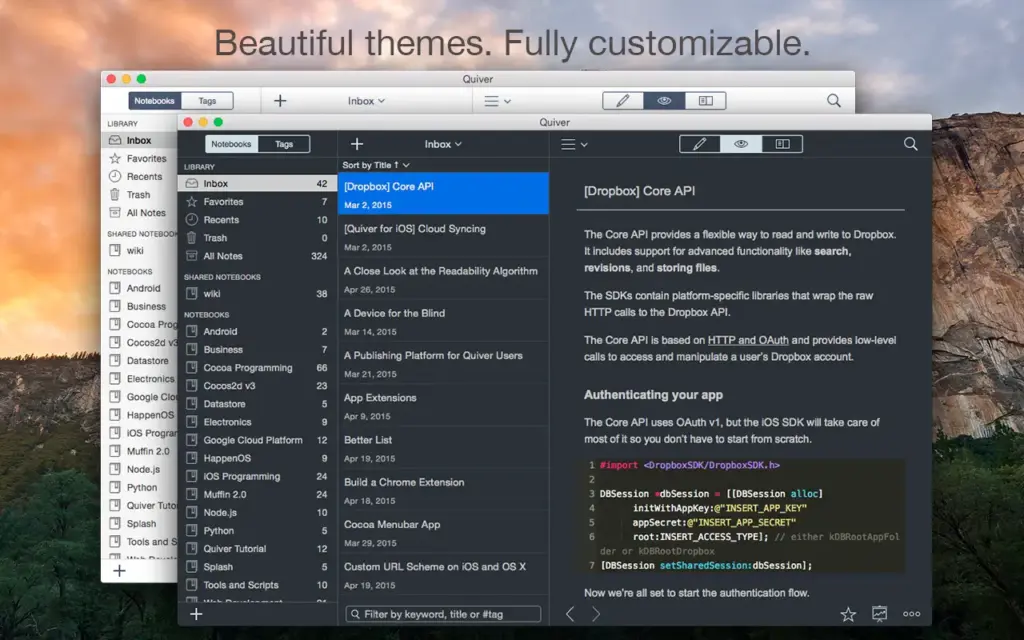
Quiver uses a unique cell-based note structure. Each note can contain multiple cells, and every cell can hold a different type of content. For example, one cell may contain plain text, another may include Markdown, while a third can store source code written in Python, JavaScript, Swift, or any other programming language.
This flexible approach makes Quiver significantly more powerful than traditional note-taking applications.
In-Place Editing Experience
Quiver offers a seamless editing experience with true in-place editing. There is no need to switch between editing and preview modes. Simply click inside a cell and begin typing immediately. This workflow allows developers to stay focused and productive.
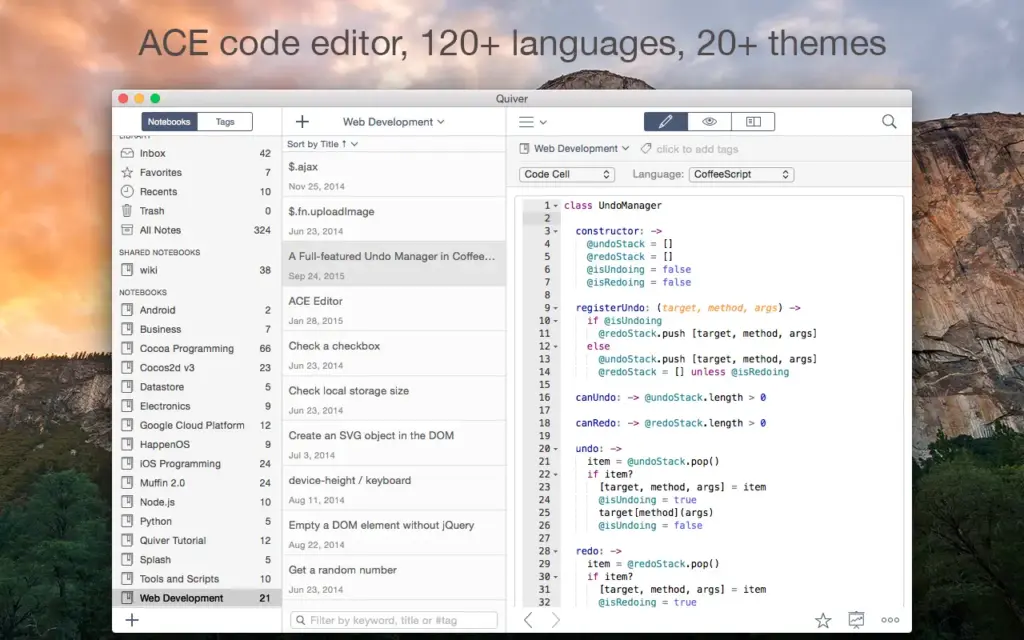
The integrated editor is powered by the ACE code editor engine, providing:
- Syntax highlighting for more than 120 programming languages
- Support for over 20 editor themes
- Auto-indent and auto-outdent functionality
- Professional code editing capabilities
Powerful Search Capabilities
Finding notes in large collections is effortless. Quiver utilizes Apple’s Search Kit technology, the same engine that powers Spotlight on macOS.
Users can search across thousands of notes instantly using:
- Prefix searches
- Suffix searches
- Infix searches
- Phrase searches
Whether searching a single notebook or an entire library, results appear almost instantly.
Complete Data Ownership
Unlike many cloud-based note-taking services, Quiver stores all notes as plain JSON files on your Mac. This provides complete ownership and portability of your data.
Benefits include:
- No vendor lock-in
- Easy backup and restore
- Export to HTML and PDF formats
- Git version control compatibility
- Integration with custom scripts and workflows
Cloud Synchronization
Quiver supports synchronization through any file-based cloud storage provider, including:
- iCloud Drive
- Dropbox
- Google Drive
- OneDrive
- Other compatible cloud storage services
Your notebooks remain synchronized across all your Macs with minimal configuration.
Version 3.3.1 also introduces multi-library support, allowing users to maintain separate work and personal libraries simultaneously.
Features of Quiver for Mac
- Cell-based note structure combining text, code, Markdown, LaTeX, and diagrams
- ACE code editor with syntax highlighting for over 120 programming languages
- More than 20 customizable editor themes
- Live preview for Markdown and LaTeX cells
- MathJax-powered LaTeX rendering
- Diagram cells for flowcharts and sequence diagrams
- Fast full-text search powered by Apple Search Kit
- Search entire libraries, notebooks, or individual notes
- Continuous autosave functionality
- Plain JSON storage with complete data ownership
- Export notes to HTML and PDF formats
- Cloud synchronization via Dropbox, iCloud Drive, and Google Drive
- Multi-library support for work and personal projects
- Shared notebooks for collaboration
- Git version control support
- One-click backup and restore
- Presentation mode for meetings and teaching
- Wiki-style linked notes
- Tag-based organization system
- Chrome Web Clipper extension support
Technical Details
Software Name: Quiver – The Programmer’s Notebook
Software File Name: Quiver-3.3.1.dmg
Version: 3.3.1
File Size: 13 MB
File Extension: DMG
License Type: Premium
Developer: HappenApps
System Requirements
- Operating System: macOS 10.13 High Sierra or later
- Processor: Apple Silicon (M1, M2, M3, M4, M5) or Intel 64-bit processor
- RAM: 8 GB minimum (16 GB recommended)
- Storage: 500 MB of free disk space
Best Alternatives to Quiver for Mac
SnippetsLab
SnippetsLab is one of the closest alternatives to Quiver. It focuses specifically on code snippet management and supports more than 440 programming languages.
Obsidian
Obsidian is a Markdown-based knowledge management application featuring powerful backlinking, graph views, and plugin support.
Notion
Notion combines note-taking, databases, documentation, and project management into a single collaborative workspace.
Bear
Bear is a lightweight and elegant Markdown editor designed exclusively for Apple devices, making it ideal for writers and casual users.
Boostnote
Boostnote is a free and open-source note-taking application designed for developers, offering Markdown support and offline-first storage.
Conclusion
Quiver remains one of the best note-taking applications for developers on macOS. Its unique cell-based architecture, powerful code editor, lightning-fast search capabilities, and complete data ownership make it an outstanding choice for programmers, engineers, researchers, and technical professionals.